
Installing the latest NowSignage Android APK
Minimum Android Specs:
-
Recommended Minimum OS version: Android 8.0+
Devices running Android 7.1 may still install and run the application, but Android 8.0 or later is recommended to ensure optimal security and long-term compatibility.
Related Content: Why we recommend Android 8
-
Dual-core processor or above (preference for quad-core processor or above)
-
2 GB of RAM or above (preferably 4 GB of RAM or above)
-
8 GB of storage or above (preferably 32 GB of storage or above)
-
VP9 codec support
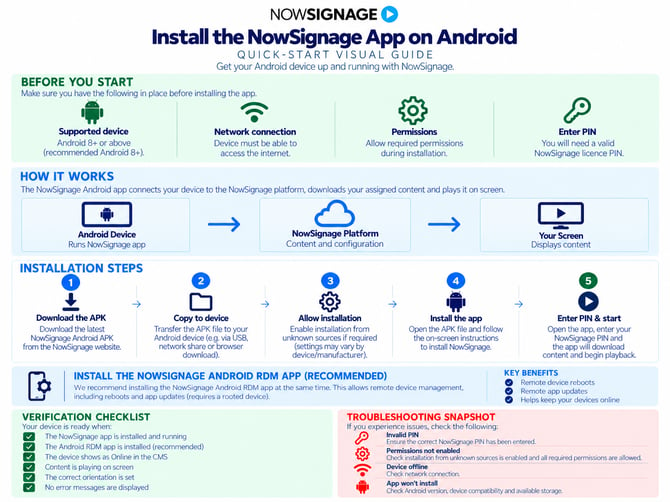
Latest Android App: (as of June 2026)
https://cdn.nowsignage.com/android/5.3.41.apk
Optional: NowSignage Remote Device Management (RDM)
🚨 We strongly recommend installing the NowSignage Android Remote Device Management application at the same time as the latest Android app.
Key RDM Features:
- Perform One-Time Remote Device Reboots:
- Restart your devices without needing to be on-site.
- Push App Updates:
- Keep your NowSignage app up to date on rooted Android devices.
- Ensure App Uptime with Watchdog:
- The Watchdog feature monitors if the NowSignage app is running and automatically restarts it if needed.
Note: This will result in two app APKs being installed as part of the installation process.
NowSignage RDM app:
https://cdn.nowsignage.com/android-rdm/1.0.3.apk
🔗 Further reading on Android RDM: Click the link
Steps to Install the NS Android app Via USB (Preferred Method)
- Click the link to download the APK - https://cdn.nowsignage.com/android/5.3.41.apk
- Once the file is downloaded, add the APK file to the root (main folder/home) of the USB drive.
- Insert the USB into your Android device and navigate to the USB via the Android file explorer. (This step can vary depending on your device).
- Click on the APK to initiate the download and click “Install” and then “Open” once the app is installed.
- Make sure to enable the permission to display over other apps.
- Open the NowSignage app and you will see the pin entry page.
Steps to Download Via Device Browser
- Open a web browser on the Android device. It may be called “Browser”, “Web Browser” or “Chrome”.
- Navigate to https://cdn.nowsignage.com/android/5.3.41.apk and the app will start to download (you may see an arrow in the notification area at the top of the screen).
- Click and drag the notification area icon down to reveal the “NowSignage.apk” notification message and click on it.
You will be presented with an option to install the Nowsignage app:
- Click “Install” and then “Open” once the app is installed.
Please Note: Once the app is installed, please ensure that the device has a network connection and that the date/time settings are correct before entering in your screen PIN.
Android 10 (and above):
For devices running Android 10 and above, after installing the app, go into the settings and enable the following permission to allow NowSignage to 'display over other apps':
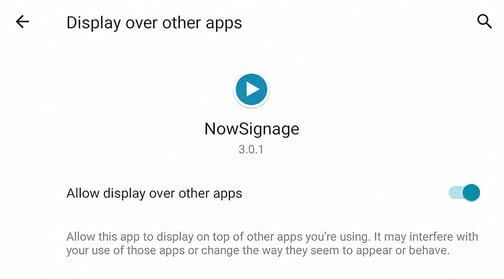
This will allow the app to autoboot upon a full restart of the Android device.
Related Content - Information and installation for Android RDM - click the link below for more information
NowSignage App Release Notes:
https://knowledgebase.nowsignage.com/nowsignage-app-release-notes-
TIP:
Share Device Location: We recommend enabling device location settings when installing the NowSignage application. This allows the device's latitude and longitude data to be shared and viewed in the screen monitoring area. This can help identify whether a PIN has been entered on the wrong device, as the location data will be displayed on a map.
🔗 Screen Monitoring: Full Estate Visibility, Single Screen Detail & Audit Logs
For various Android players, use this general checklist (menu names will vary)
| Setting | Typical path |
|---|---|
| Enable device location | Settings → Location → On |
| Allow NowSignage access | Settings → Apps → NowSignage → Permissions → Location → Allow while using the app |
| Enable precise coordinates | Turn on Use precise location, if available |
| Improve location detection | Settings → Location → Location services → Google Location Accuracy → On, if available |
NowSignage App Troubleshooting
NOTE: Before installing version 5.0 or later, make sure to uninstall and completely remove any previous versions (3.0 or below) from the device. Neglecting this step may lead to issues with the app not updating properly.
Issue: 'ENCOUNTERED AND UNKNOWN ERROR COMMUNICATING WITH NOWSIGNAGE'
Possible Causes: (in order of relevance)
1. There is no internet or network connection to the device.
2. Date/time is incorrectly set on the device.
-------
3. The app could not communicate with the NowSignage API.
4. The PIN code is not associated with a Screen
Solutions:
1. Ensure the device has a working internet connection; use the device's web browser or other internet-based apps to confirm connectivity.
2. Go into the date/time settings and set it to the current correct date/time.
3. Ensure the requests are not being blocked by a corporate firewall. Please see our firewall rules guidance.
4. Ensure the correct PIN code has been added by verifying within the NowSignage platform. (check for additional character spaces entered in error)
Issue - Why is my screen not updating when I change the schedule in the CMS?
Ensure your device's date and time settings are configured to set automatically via network, rather than being set manually. A manual clock can occasionally cause the device and CMS to fall out of sync, resulting in updates being silently ignored. This applies to all Android devices as a best practice and can be configured under Settings → Date and Time → Set Automatically.