
⚠️ Important Information
-
CMS Update (no app update required, although a minimum app version is required to fully utilise the monitoring area and RDM commands) - Please ensure your screen estate is updated to the latest available application version.
- CMS Release Date: 20/7/26.
- Supported Platforms:
- Global (secure.nowsignage)
- Middle East (ME) - (ap-southeast-1)
NowSignage’s monitoring tools give you complete visibility across your screen estate, from a full project overview down to individual device and network details, with a full audit trail of monitoring activity.
Designed to support both day-to-day management and faster troubleshooting, the feature provides detailed estate insights that help you quickly identify screen status, review device information, monitor connectivity and understand what is happening across your deployment. Account Owners have access as standard, while Support or Installation teams can also be granted access through custom permissions set by the account owner, allowing the right users to view screen analytics and monitoring data relevant to their role.
Whether you are checking the health of your wider estate or investigating an issue on a single screen, Monitoring gives you the information needed to manage screens more effectively and take action with confidence.
This guide covers:
- Granular permissions for Monitoring and Audit Logs
- Screens Dashboard – new monitoring widgets and filters
- Monitoring – Project Overview
- Monitoring – Single Screen
- Audit Logs
⚠️ Granular Permissions (IMPORTANT) ⚠️
Please review the information.
Monitoring and audit log access is included by default for all Account Owners.
Visibility of this feature is based on each user’s current access permissions, so users will only see the screens they are permitted to access.
Summary: Default access.
-
Account Owners:
-
Access to project-level Monitoring ✅
-
Access to Screen-level monitoring ✅
-
-
Project Managers
-
Access to Screen-level monitoring ✅
-
Access to Project-level monitoring ❌
-
-
Other Roles ❌ (no access to either unless a custom role has been created)
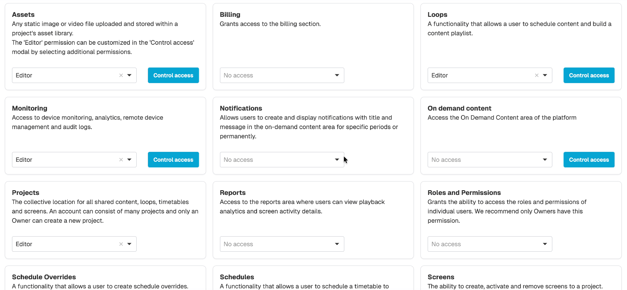
Monitoring access can also be set independently per user, allowing you to:
- Assign Editor, Viewer, or No Access per area
- Apply access project-wide or scope it to specific screens
- Keep areas fully hidden from users without access
This is managed via Roles and Permissions — please refer to the 'User Management' section of the Knowledge base for more information on user access management https://knowledgebase.nowsignage.com/nowsignage-cms-user-guides#main-content
Features:
-
Screens Dashboard – Monitoring Widgets & Filters
- ⚠️ NOTE: Monitoring Widgets Coming soon! - Pls watch this space.
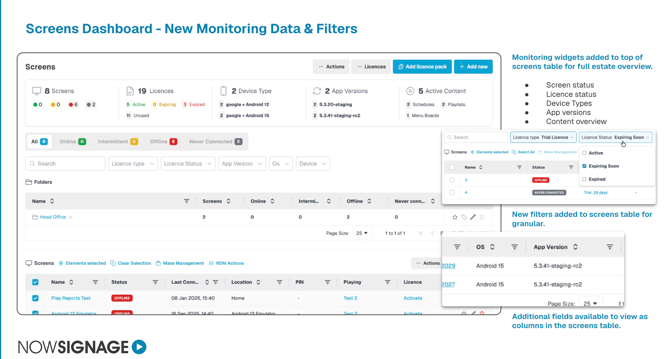
The main screen tab now includes summary widgets at the top of the page, giving a full estate overview at a glance.
- Screen status
- Licence status
- Device Types
- App versions
- Content overview (schedules/playlists)
Tip: Filters are available within the Screens table for more granular searching, including Licence Type and Licence Status (Active, Expiring Soon, Expired).
Additional columns are available to add to the Screens table, including Operating System (OS) and App Version, so you can see this information without opening each screen individually.
-
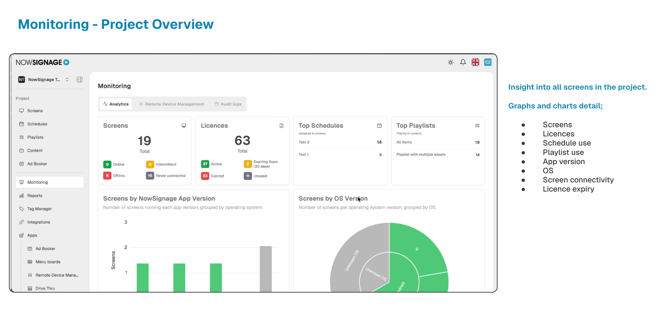
Monitoring Analytics – Project Overview
 How to access:
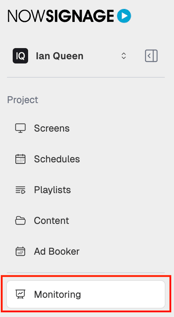
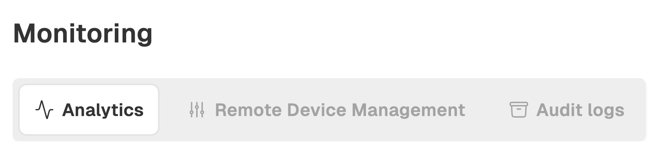
- From the left sidebar, click into 'Monitoring'.
- Select the 'Analytics' tab.
This gives you insight into all screens within the project, with graphs and charts covering:
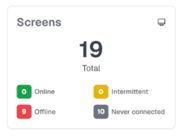
- Screens (total, online/offline/intermittent/never connected)
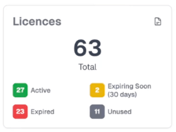
- Licences (active, expiring soon, expired, unused)
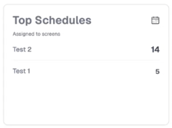
- Top Schedules and Top Playlists in use
- Screens by NowSignage App Version
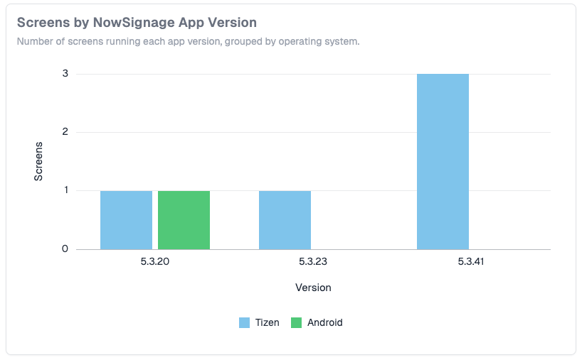
- Screens by OS Version
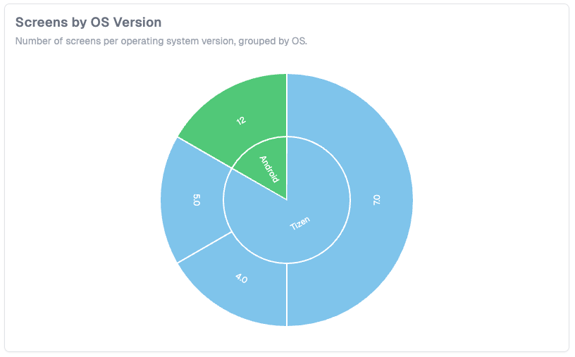
❗Note: 'Unknown OS or NowSignage App Version'
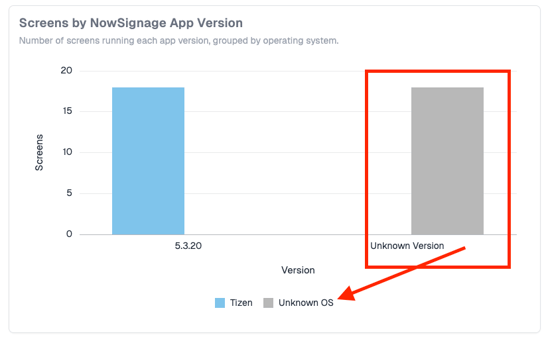
Unknown OS version may appear where a device has not yet reported its OS version back to the CMS — this is expected for screens that have never connected or have not checked in recently with the NowSignage platform.
Unknown App version will appear where the minimum app version (5) is not installed on the media player - Please ensure to update all screens to the latest application version.
-
Monitoring – Single Screen
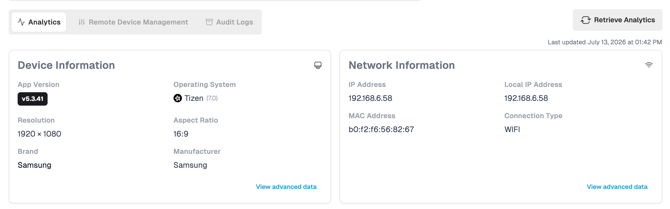
- Click into the individual screen from the Screens table.
- Select the 'Monitoring' tab, then 'Analytics'.
This provides device-level detail, including:
- Device Information (App version, OS, resolution, aspect ratio, brand, manufacturer)
⚠️ Important Note:⚠️ Hardware information is pulled directly from the device, so NowSignage cannot guarantee the accuracy of this data in all cases. - Network Information (IP address, local IP address, MAC address, connection type) - IP Address can also be identified and used when setting up Screen Sync on supported OS.
- Location Information: This data can help confirm that the correct PIN has been entered for the screen. (location data permissions will need to be allowed/accepted to display data)
- App Logs: Retrieve screen logs to aid support-level troubleshooting.
-
Remote Device Management (RDM)
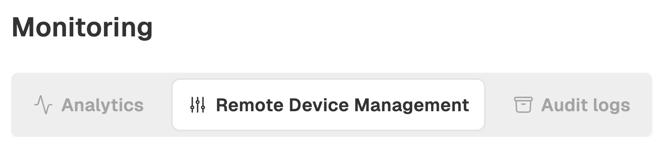
Remote Device Management (RDM) is now accessed and managed through the project and screen-level monitoring tool, giving you a central place to view screen data and carry out supported remote actions. To use the new support RDM commands, screens must be running App Version 5.2.60 or later, so we recommend ensuring your estate is updated to the latest available version before attempting any remote actions.
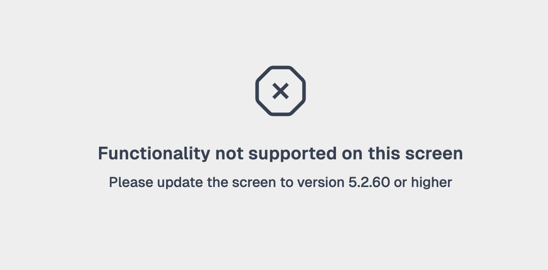
⚠️ Once your estate is running a supported app version, please discontinue using RDM via the App Store plugin method.
Advanced notice: this app plugin version will reach end of life (EOL) and be removed from the platform at the end of 2026.
-
RDM Mass Management Commands:
From the main screens menu, RDM OS-supported commands can now be triggered on Mass - Simply select the required screens and click 'RDM Actions' to action the command.
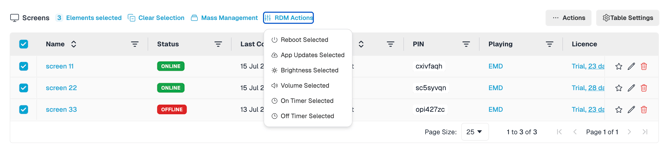
The RDM monitoring area will record estate-level logs for any commands carried out.
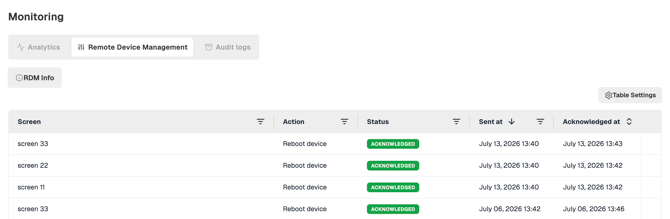
Please see the complete in-depth guidance on RDM Commands:
https://knowledgebase.nowsignage.com/nowsignage-remote-device-management-rdm
-
Audit Logs

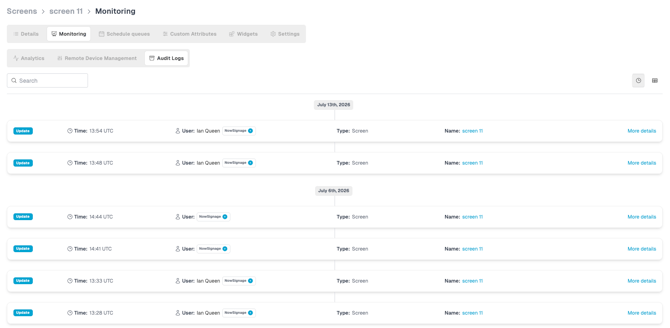
Audit logs provide a clear, time-stamped record of activity across your screen estate, helping you track what actions have taken place, when they happened and which user carried them out.
Choose exactly what each user can see with full granular access, ensuring users only see the data that is relevant to them:
- Click into the individual screen from the Screens table.
- Select the 'Monitoring' tab, then 'Audit Logs'.
Tip: Clicking into 'more details' on each line action will confirm the change made:
e.g., renaming a screen from 'Screen 1' to 'Screen 11'
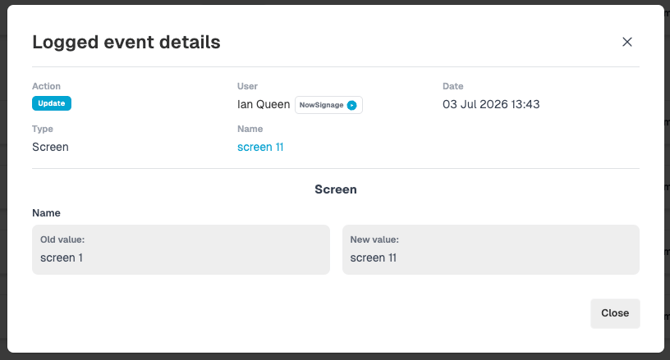
Audit Logs give full visibility of all monitoring activity for that screen, including:
- What action was taken
- When it was taken and by which user
- A full activity history across your estate
-
Troubleshooting / QA.
Q. - A user is unable to see the Monitoring area in the sidebar menu. / A user sees different screen totals to another member of the team
A. - Review and ensure the correct access permissions and User Access Tags have be applied. - Please Note: For security compliance, NowSignage is unable to amend user permissions. Please consult with the Account Owner for any required access permission reviews or changes.
Q. - My NowSignage application version data is displaying as Unknown.
A. - NowSignage screen analytics is available on application version 5.2.60+ - Please update your hardware to the latest app version.
Q. - The device information displayed doesn't appear to be accurate.
A. - Device information is pulled directly from the hardware - NowSignage is unable to guarantee the accuracy of this data.
Q. - There is no location information displaying
A. - Location data permission needs to be enabled and accepted on the device. - If not no data will be available.
Q. - I don't recognise the NowSignage app version number? / It is displaying a strange version number.
A. - The NowSignage React Native app builds are versioned for simple identification. Please review whether your project is running a custom-built app version. - Consult with NowSignage support if still unsure.