
Why Your Content Dimension Sizes Matter
When creating content, it is essential to follow our recommended dimension sizes before uploading to your NowSignage account. Adhering to these guidelines ensures optimal performance of your hardware and helps prevent potential issues.
⚠️ If your content exceeds the recommended sizes, your hardware may struggle to output and scale the larger files effectively. This can lead to potential device malfunctions.
Conversely, using content that is too small can also burden your hardware, as it will need to stretch the image or video (especially if you have enabled stretch videos in your screen settings) every time it is rendered on the display.
Oversized Image Asset Warnings
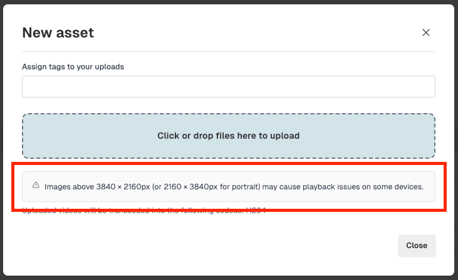
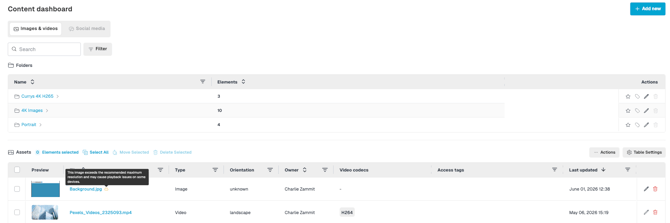
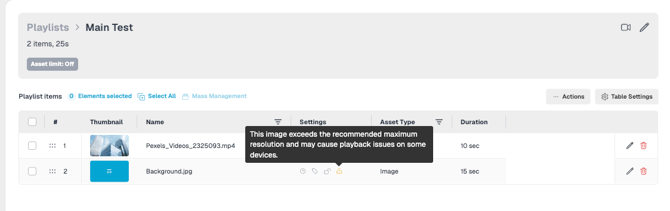
The CMS provides informational warnings when image assets exceed the recommended maximum dimensions of 3840 × 2160 pixels (landscape) or 2160 × 3840 pixels (portrait).
These warnings are designed to help identify images that may cause playback performance issues.
The warning serves as guidance only and does not prevent assets from being uploaded, published, or added to playlists.
Oversized image warnings are displayed throughout the CMS, including:
- Upload Modal
- Content Dashboard
- Playlist Items Table
- Asset Details Modal
The warning status is automatically determined using the stored metadata of each image asset and applies to both existing and newly uploaded content.
Where required, users can continue to use oversized images for specialised deployments, such as LED walls or other large-format display environments.
Benefits
- Helps identify image assets that may impact playback performance on supported devices
- Promotes adherence to recommended image dimensions and best practices
- Supports specialised use cases that require higher-resolution assets
- Provides consistent visibility of image sizing recommendations across the CMS
Asset Guidance:
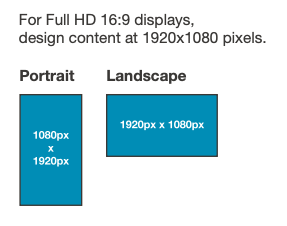
Recommended Content Dimension Sizes:
Portrait: 1080 x 1920
Landscape: 1920 x 1080
Asset Naming Conventions
When naming your files, it is always best practice to avoid having a file that has the same name.
It is also good to avoid having very long file names; the max character length should be no more than 60.
⚠️ Please note - If a file exceeds the character limit, the screen may display a continuous loading icon and the content will not appear. To fix this, simply rename the asset in your Content Dashboard or remove the file altogether.
Troubleshooting / FAQ's
Q. What is the maximum quantity of videos and images that can be uploaded to the CMS portal?
A. There are no limits on the number of assets that can be uploaded to a project. However, we recommend regularly managing your assets by deleting those that are no longer in use to maintain an organised and efficient workspace.
Q. What is the maximum upload size for videos and images in the CMS portal?
A. MAX 5GB - Images recommended - Portrait: 1080 x 1920 Landscape: 1920 x 1080
Q. What is the maximum quantity of videos and images can be downloaded onto a screen?
A. Unlimited from NowSignage. Device/hardware being used rules this, for which NowSignage has no control. - You would need to seek guidance from the hardware manufacturer on this point.
Q. What is the maximum size for content running on a screen while it is not connected to the internet?
A. This is not a concern, as the content is downloaded and stored on the device or hardware. If the device loses its network connection to the application, the content will still play in 'offline' mode, except for internet-based assets like web pages, YouTube videos, and Power BI. - Note: New content added to a schedule will not update until the network connection is re-established.
Further Reading: How to Replace A Piece of Content.