
When you activate a screen using its PIN, that PIN becomes linked to the device on which it was entered. It cannot then be used to activate another device while that association remains in place.
This security measure prevents the same PIN from being used across multiple devices and maintains one licence per screen.
⚠️ Warning: If you need to move an existing screen to a replacement device, you must first deactivate the PIN to release its association with the original device. Simply entering the same PIN on the replacement device does not transfer the activation.
If you see “PIN already in use”, follow the deactivation process before using the PIN on another device.

Deactivate the PIN in NowSignage

1. Log in to your NowSignage account and open the relevant project.
2. Go to Screens and find the screen associated with the PIN.
3. Click the screen name or pencil icon to edit it.
4. Open Actions in the top-right corner and select Deactivate.
5. Confirm the action with 'I UNDERSTAND PROCEED' button.
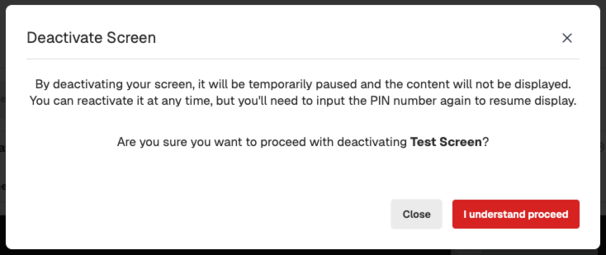
Once the PIN is deactivated, the 'Actions' button will not be presented until the PIN is re-entered onto the device.

If you do not see the 'Deactivate' option in NowSignage.
If the Deactivate option is missing from the Actions menu, this relates to the device’s hardware, operating system or installed NowSignage app version. Devices running an app version earlier than version 5 do not support this option.
Where Deactivate is unavailable, reinstall the NowSignage app using the installation guide for your hardware and operating system:
1. Uninstall the existing NowSignage app from the device.
2. Clear any remaining NowSignage app data and cached storage using the steps available for your device. Clear only NowSignage-related data, not storage belonging to other applications.
3. Install the latest NowSignage app version available for your hardware and operating system.
4. Launch the app and enter the required screen PIN.
💡TIP: Plan this work for a suitable maintenance window, as the device will not display NowSignage content while the app is being removed and reinstalled.