⚠️ IMPORTANT ⚠️
-
App Version 5.4.1+ required.
To benefit from this enhancement, please ensure your estate is running NowSignage app version 5.4.1 or above.
Summary:
A screen can remain connected to Wi-Fi or a wired network even when internet access is slow, restricted, or unavailable. This can prevent new content from downloading.
In NowSignage Version 5.4.1+, the application can automatically detect stalled downloads and retry them, helping screens recover when their internet connection improves.
What happens if a download stops?
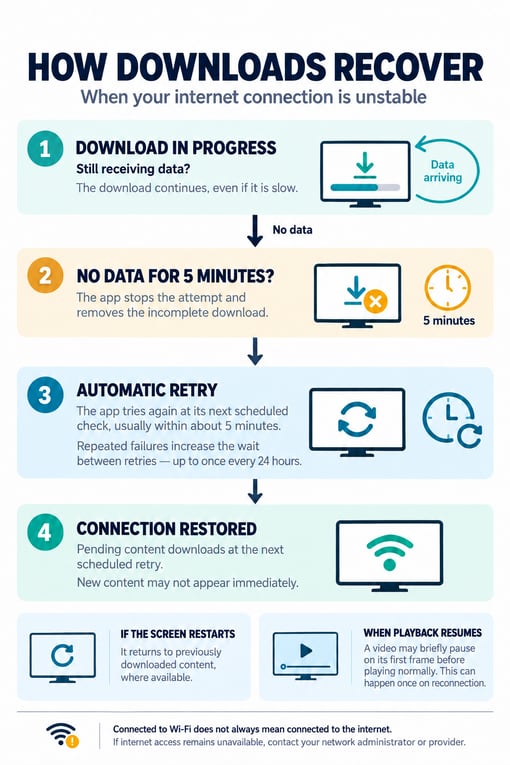
Downloads continue as long as data is still being received, even on a slow connection.
If a download receives no data for five minutes, the app stops that attempt, removes the incomplete download, and schedules another attempt. This prevents the screen from remaining on “Downloading” indefinitely.
If the screen restarts during a stalled download, it returns to previously downloaded content, where available.
When will the app try again?
The first retry happens at the next scheduled check, usually within approximately five minutes. If attempts keep failing, the app gradually increases the time between retries, eventually retrying once every 24 hours.
This means new content may not download immediately after internet access returns. The app will try again at its next scheduled retry.
What might I see when the connection returns?
Once pending content downloads, the current video may briefly pause on its first frame before playing normally. This can happen once when the screen reconnects.
What should I check if content is still waiting to download?
Check that the screen’s network has working internet access. A connected Wi-Fi or network indicator alone does not confirm that internet access is available.
If the network provider has restricted or interrupted internet access, your network administrator or provider will need to resolve it. The app can recover from interrupted downloads, but it cannot restore the network’s internet connection.