
An image or video may become corrupted for various reasons, preventing it from processing correctly. If you encounter an issue while uploading an image or video that results in continuous processing, refreshing the page will display an error message along with an error ID. Below, you will find some common causes of corruption and examples of corresponding error codes.
-
Error: Broken video
The error message is generated for a broken video file. In this case, the video contains no usable data and therefore has no effective file size, so it is not possible for NowSignage to process or transcode it.
- Fix: Your video file is corrupted because it contains no data. Please obtain a fresh copy of the video from the original source (for example, re-export from your editing software or re-download from your media library) and then upload the new file to NowSignage.
-
Error: Unsupported file type
The error message 'You cant upload files of this type appears when an image is uploaded in an unsupported file type. Because the file type is not supported by NowSignage, the upload will not process and the asset cannot be used in playlists or layouts.

- Fix: Convert the file into one of our supported formats before uploading. You can do this using standard image or video editing tools by choosing “Save As” or “Export” and selecting a supported format.
NowSignage supports the following file formats and file sizes:
|
Video formats <500mb |
Image formats <15mb |
| MP4 | JPG |
| MOV | PNG |
| WEBM | TIFF |
| AVI |
GIF |
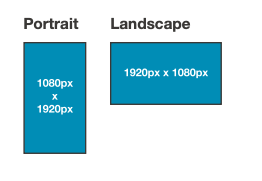
For Full HD 16:9 displays, design content at 1920x1080 pixels:
- Portrait - 1080px x 1920px
- Landscape - 1920px x 1080px
Best practice is to keep file sizes as low as possible. This will ensure assets upload and process quickly, as well as allow for efficient playback across hardware. If you are looking to display PDFs, please convert these files to JPG images, then upload into NowSignage. For PowerPoint files, either convert the slides to JPG images or convert the whole slideshow as a video then upload your files into NowSignage
NowSignage accepts files with any file name. However, we recommend following your organisation’s existing file naming conventions and ensuring all NowSignage users are familiar with how assets should be named.
⚠️ Important: The NowSignage CMS enforces a file name character limit. Please ensure all file names are kept under 60 characters.
If you attempt to upload a file with a name longer than 60 characters, an on‑screen error message will be displayed.

You can also review the full and most up-to-date list of supported file types in our Knowledge Base:
-
Error: Video exceeds maximum upload dimensions
If the pixel dimensions of your video exceed 8,192 x 8,192, you will see a processing error message. This is the maximum resolution that can be uploaded and processed in NowSignage. Files above this limit cannot be transcoded consistently across devices and will therefore fail during processing.
Fix: Resize or re-export your video so that both its width and height are within the supported 8,192 x 8,192 pixel limit, then re-upload the updated file to NowSignage.
Just to note the maximum resolutions which AWS allow are below:
- HD
- Supported Codecs: H.264, H.265, VP8, VP9
- Landscape: Up to 1920 × 1080
- Portrait: Up to 1080 × 1920
- 4K
- Supported Codecs: H.265 4K, VP8 4K, VP9 4K
- Landscape: Up to 3840 × 2160
- Portrait: Up to 2160 × 3840
- 8K
- Supported Codecs: H.265 8K
- Landscape: Up to 8192 × 4320
- Portrait: Up to 4320 × 8192
- GIF
- Supported Format: Animated / Static GIF
- Maximum Resolution: Up to 3840 × 3840
Please keep in mind that NowSignage categorises codecs into specific resolution tiers to prevent media players from crashing due to oversized content.
If you are still receiving an error code and you can not resolve this from the guidance above, please make note of your image/video ID number and log a support ticket