
⚠️ PLEASE NOTE: -
The latest NowSignage application version:
-
v5.3.46. (released Sept 2026)
NowSignage platform Supported Functionality:
-
Images and Video
- Gapless playback
- Overrides
- Widgets - Clock, RSS, Announcements
- IPTV live streams
- Web pages
- Power BI
- Content Triggers
- Weather Widget
- Secure Dashboards
- 24/7 testing – playback verified over 1 week.
Not Supported:
- Screen Sync
- YouTube
- Remote Device Manager (RDM)
Additional notes: Portrait orientation isn’t supported by default; to use it, you’ll need to apply rotation within the CMS settings.
- After following the setup guide to set up your Amazon signage stick support.signage.amazon.com/how_to_set_up_your_amazon_signage_stick.html
Step 1.
- Upon startup, the Amazon Signage Stick device will guide you to choose your preferred language and connect to a nearby Wi-Fi network.
Please note: After connecting to a Wi-Fi network, the Amazon Signage Stick may automatically download and install updates. This is a standard procedure, so kindly allow it to finish the process without interruption.
- After all updates have been successfully installed, the Signage Stick will present a 6-digit code along with the URL (https://signage.amazon.com) for device registration.
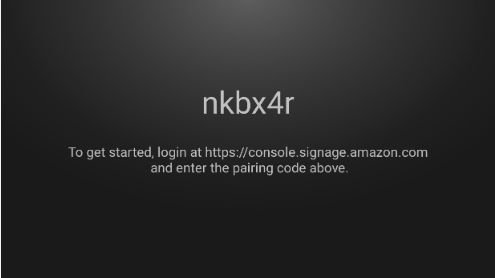
Note - You will need to sign in to you Amazon account as part of this set up process. If you do not have an Amazon account, you will need to create on at this stage.
Step 2.
When you are logged into the console. Go to the SignageSticks on:
- You will see the option to enter the pairing code that is on your physical display, enter this and click Verify, then next.
- You'll now have the option to select your CMS.
- Select 'NowSignage' from the App list and click next, then confirm the choice by clicking 'add stick'.
- The app should then install and launch on the SignageStick.
Step 3.
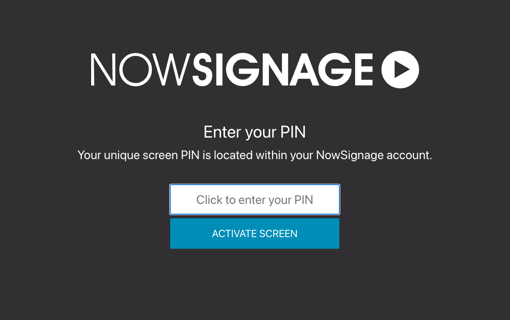
- Upon launching NowSignage, the PIN activation screen will appear, allowing you to enter your PIN.
- Input your NowSignage screen PIN and click on 'Activate' to initiate the loading and display of your scheduled content.
TIP - For Amazon Signage Stick troubleshooting, please see Amazon Signage Support